
ERROR 113:
Invalid roughness for Conduit xxx.
Error 113 : Conduits cannot have zero or negative roughness values.
Quick Fix — Start Here
Locate the conduit identified in ERROR 113 and check its Roughness (Manning's n) value.
If pipe-material data are available, use the GeoSWMM Conduit Roughness Update tool to assign an appropriate roughness value based on material.
Confirm: Manning's Roughness n > 0
Save the changes and re-validate the model.
1. Description
Every conduit in EPA SWMM requires a positive Manning's roughness coefficient (n). Roughness represents the frictional resistance of the pipe or channel surface and affects hydraulic routing. ERROR 113 occurs when the conduit identified in the error message has a roughness value of zero or less. This is an input-validation error that must be corrected before the simulation can proceed.
In GeoSWMM, roughness can be assigned directly to individual conduits or updated systematically using the Conduit Roughness Update tool. The tool includes a SWMM reference table of Manning’s roughness values by pipe material. You can also add your own material-roughness table or use another accepted reference table to match project standards or design criteria.
2. Technical Background
Manning's roughness coefficient represents resistance to flow and is used in hydraulic calculations.
Manning's equation is:
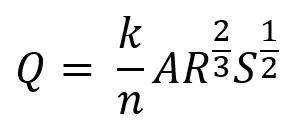
where n is Manning's roughness coefficient.
Required condition: Manning's Roughness n > 0
Because n appears in the denominator, n = 0 is mathematically invalid. A negative value is also physically invalid.
A positive value satisfies the SWMM validation check, but the selected roughness should still represent the conduit material and condition.
3. Resolution
Start with the conduit identified in ERROR 113. Confirm its roughness value, then determine whether pipe-material data or another documented source should be used to correct it.
Table 1 : Troubleshooting steps
Step | Action | Why It Helps |
|---|---|---|
1 | Identify the flagged conduit and check its roughness.
| Identifies the value causing ERROR 113. |
2 | Check the pipe-material information.
| Establishes the basis for assigning an appropriate Manning's n. |
3 | Use the GeoSWMM Conduit Roughness Update tool.
| Provides a consistent and efficient way to assign roughness across the conduit network using the reference source appropriate for the project. |
4 | If roughness was imported or entered manually, verify the value.
| Corrects invalid inputs while keeping the replacement value technically supported. |
5 | Review the remaining conduit network.
| Helps prevent repeated ERROR 113 messages for other conduits. |
6 | Save and re-validate the model.
| Confirms that valid roughness values are being supplied to EPA SWMM. |
Recommended Practice - Assign Roughness from Pipe Material
When pipe-material information is available, use the GeoSWMM Conduit Roughness Update tool to assign Manning's roughness values. Use the built-in SWMM reference table or add a custom/reference table based on project standards or other accepted sources. This reduces manual input, improves consistency across the conduit network, and helps prevent missing or invalid roughness values.