Release Notes
GeoSWMM Version 5.5.1
April 07, 2026
GeoSWMM 5.5.1 enhances the Elevation Manager and Flood Mapping Tool to improve efficiency and reliability in elevation processing and flood visualization. This release also includes usability improvements and workflow refinements that support consistent, accurate, and efficient modeling performance within ArcGIS Pro.
Key Improvements
Elevation Manager Enhancements
This release aims to introduce a more flexible elevation extraction workflow with support for multiple types of data sources. The interface has been updated to a dockable design for improved usability and consistency with other GeoSWMM tools.
The tool now supports multiple topographic data sources, including contour GIS layers and DEM raster datasets. In addition, validation checks have been implemented for input fields to ensure a reliable and uninterrupted workflow.
Flood Mapping Tool Enhancement
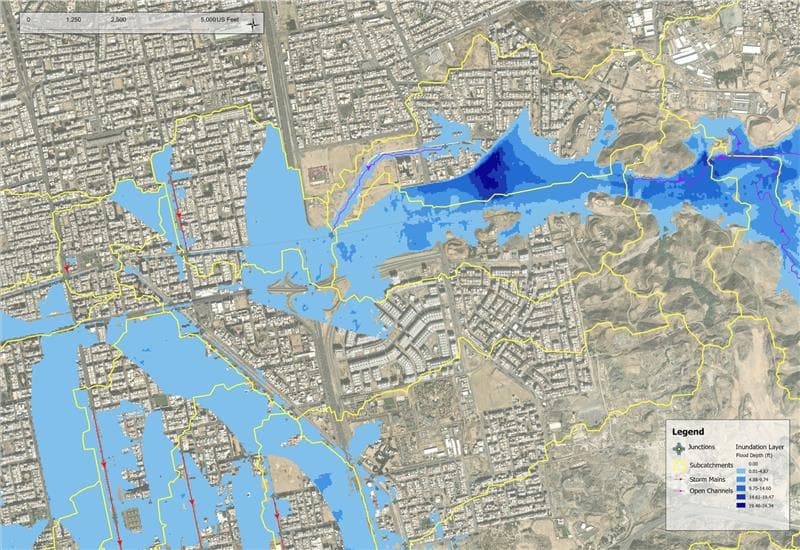
GeoSWMM 5.5.1 enhances the Flood Mapping Tool by improving the methodology for flood depth generation and flood boundary calculation. Flood visualization has also been improved with clearer symbology for both 1D and 2D flood depth rasters, making results easier to understand and interpret.
Results Integration with Model GIS Layers
Simulation results are now directly integrated into attribute table of model GIS layers for both 1D and 2D features. This enhancement allows users to access results within the GIS environment without additional data joins or manual mapping. By linking results to spatial features, this update improves data accessibility, streamlines analysis and enhances visualization for more efficient reporting, mapping, and informed decision-making.
Enhanced Map Visualization for Watershed Delineation
The layer display generated by the Watershed Delineation Tool has been reorganized for improved clarity. Transparency in layer symbology helps users better understand spatial relationships between features and improves overall map readability.
Resolved Issues
Issue Name | Description |
|---|---|
Improved Stability of Watershed Delineation Tool | Enhanced the stability of the GeoSWMM Watershed Delineation Tool to support reliable performance during workflow restarts and repeated runs after data import. Improved intermediate data management ensures smoother operation and consistent results. |
Surface Flow Path Tool Enhancement | Enhanced the Surface Flow Path (SFP) workflow to improve compatibility with different data setups, providing more flexible and reliable model development. |
Enhanced Table Interaction in Watershed Delineation Tool | Improved the handling and management of selected features within the Watershed Delineation workflow. Added a “Delete All” option for faster workflow execution. |
Added Validation for DEM Clipping in Watershed Delineation Tool | Added validation to the DEM clipping step to ensure selected boundaries fall within the DEM extent, with warnings to guide correct input and improve processing accuracy. |
Outlet Point Import Validation | Added validation during outlet point import to ensure points fall within the DEM extent, improving input accuracy and subcatchment generation. |
LULC Reclassification Improvement | Improved the LULC reclassification workflow by enhancing the handling of duplicate entries. Warning messages are now consolidated, providing clearer and more concise user feedback. |
Interface Icon Update | Updated the Clip DEM icon to improve visual clarity and provide a more consistent look across the interface. |
Infiltration Method Change Improvement | Infiltration method changes in GeoSWMM are now handled more smoothly, ensuring consistent model behavior and a more reliable workflow when switching between methods such as Curve Number. |
Default Conduit Length Setting Update | The default Conduit Length Type for new projects has been updated to 3D, ensuring conduit lengths are calculated using true geometry for improved modeling accuracy. |