Release Notes
GeoSWMM Version 5.6
June 01, 2026
GeoSWMM 5.6.0 delivers a redesigned Profile Plot Tool along with a range of workflow improvements across model setup and validation. Together, these updates make profile generation faster, validation more reliable, and everyday modeling workflows smoother and more intuitive.
New Features
Profile Plot Tool
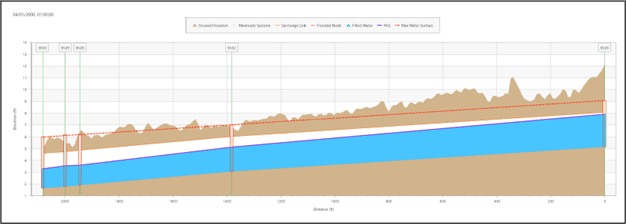
The Profile Plot Tool has been significantly enhanced to make elevation and hydraulic profiles faster to create and easier to interpret. Improved path-selection logic provides quicker and more reliable profile generation in complex networks, reducing manual adjustments and streamlining analysis workflows.
A new Plot Options panel gives users greater control over profile visualization. Profile lines, node symbols, labels, gridlines, chart titles, and axis settings can now be customized to create cleaner and more informative profile plots for analysis and reporting.
The tool now integrates directly with the Elevation Manager, allowing quick access to ground elevation extraction and visualization within profile plots. A new Flow Profile Options menu enables visualization of both dynamic simulation results and static peak-flow conditions in the same profile view, providing a more complete understanding of network performance under varying conditions.
Export capabilities have also been improved to support more reliable reporting and profile documentation workflows.
Key Improvements
Watershed Delineation Tool
Repeated runs of the Watershed Delineation Tool now provide options to Overwrite, Append, or Discard existing delineation results when model features already exist in the project. This enhancement helps prevent accidental data loss and improves iterative watershed development workflows.
Outlets created using Draw Outlet on Map are now validated against the DEM extent. Outlet points placed outside the DEM coverage trigger a warning and are excluded from subcatchment generation.
2D Model Setup
A new validation step has been added during 2D model setup to ensure that the boundary layer remains within the DEM extent. If the 2D boundary extends beyond DEM coverage, GeoSWMM now displays a warning before invalid mesh generation occurs.
Network Analysis
The Network Analysis Tool has been enhanced to improve detection of orphan nodes and links containing missing or Null attribute values, helping identify data issues earlier in the modeling workflow.
ArcGIS Pro 3.7 Compatibility
GeoSWMM 5.6 has been upgraded to .NET 10 and is fully compatible with ArcGIS Pro 3.7. This update aligns GeoSWMM with the latest ArcGIS Pro development platform and Microsoft framework, ensuring continued compatibility, and improved application responsiveness and performance.
Resolved Issues
Issue Name | Description |
|---|---|
Boundary Layer Cleanup | The ‘Define Boundary Layer’ workflow now automatically removes temporary working layers from the Table of Contents (TOC) when the window is closed. |
Subcatchment LID Cleanup | Fixed an issue where deleted LIDs were not properly removed from subcatchments, which could cause simulation errors. |
Watershed Import Defaults |
Fixed a rare issue where subcatchments and conduits imported from the Watershed Delineation Tool had User Defined Area and User Defined Length enabled by default. |
Improved Workflow for Importing INP Files | Fixed an issue where pollutant and land use property values defined in EPA SWMM INP files were not fully imported into the Pollutant Editor and Land Use Editor. |